

Minecraft 服务端插件
Take It Out — Minecraft Mod (Shulker Picking + Easy Place)
Minecraft mod that lets you pick blocks from shulker boxes using mouse wheel, Easy Place, or right-click — perfect for Litematica schematics and printers.
- 版本范围
- 1.20.1–26.2
- 下载量
- 5.3 万
插件介绍
⚡ TakeItOut — Fast Shulker Block Picking + Easy Place
Pick blocks directly from shulker boxes — whether they’re in your inventory or placed in the world — using:
- the pick block key (mouse wheel)
- Litematica Easy Place (right-click in schematics)
- or regular right-click in schematics with Auto Take Out enabled
Build faster than ever — whether you use Easy Place or place blocks manually.
Works seamlessly with Litematica schematics and is especially useful with any Litematica printer.
🎥 Video Guide
✨ Key Features
-
📦 Pick blocks directly from:
- shulker boxes in your inventory
- linked containers placed in the world
-
🧱 Litematica Easy Place support
Right-click schematic blocks to auto-pick and place them exactly as defined by the schematic -
🖱️ Manual placement support (Auto Take Out)
Right-click in schematics to automatically take the required item while placing blocks normally -
⚡ Works with Litematica schematics
-
🖨️ Compatible with:
- original Litematica printer
- litematica-printer (BiliXWhite fork)
-
🔄 Support for Tweakeroo Restock
-
🖱️ Pick block support using the mouse wheel
-
🔄 Auto pick mode (toggle with R)
-
📦 Extraction Modes:
- SINGLE ITEM
- FULL STACK
(switch with B)
-
📁 Container Groups
Save, switch and share named container setups with other players on the server -
🌐 Server-side Shared Groups
Publish container groups to the server and let other players import them instantly -
📦 Box Selection Tool
Select a cuboid area to automatically link all containers inside it
📦 Linked World Containers
Link placed containers using the configurable Link Looked-at Container hotkey (H by default).
Supported:
- shulker boxes
- chests
- barrels
Features:
- 🌐 Cross-container item access
- 🌍 Cross-dimension support
- 📊 Litematica material list integration
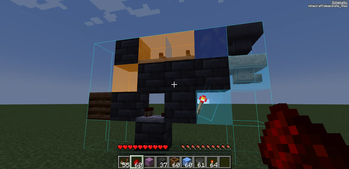
- 🟢 Linked container outline rendering
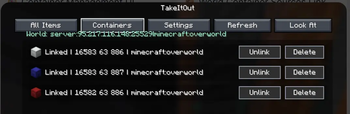
- 🧭 Container management UI
You can also create:
- 📁 Container Groups — save, switch and share named container setups
- 🌐 Shared Server Groups — publish groups for all players on the server
- 🗑️ Dump Containers — automatically store displaced inventory items during swaps
- 📦 Box Selection — bulk-link containers inside a selected area
🧭 UI & Item Management
All Items Tab
- View all available items
- 🔍 Search/filter items
- 🖱️ Left-click → request full stack
- 🖱️ Right-click → request single item
Containers Tab
Manage:
- linked containers
- dump containers
- container groups
Includes:
- linked container counters
- Delete All actions
- improved item pulling UX
⌨️ Keybindings
| Action | Default |
|---|---|
| Toggle Auto Pick | R |
| Switch Extraction Mode | B |
| Link Looked-at Container | H |
| Mark Dump Container | G |
🆕 Recent Updates
- Added server-side shared container groups with import/remove support
- Added Box Selection mode for bulk container linking
- Improved Easy Place reliability after reconnects
- Correct block placement in water
- Better redstone wire matching
- Fixed inventory overflow and item merge issues
- Tools no longer get moved into world containers accidentally
- Chat notifications for scan limits and server restrictions
- Server config option to disable item requests from All Items tab
⚠️ Compatibility Notice
Item Swapper
TakeItOut may conflict with Item Swapper because both modify item picking behavior.
Possible issues:
- incorrect item selection
- unexpected hotbar swaps
👉 If problems occur, try disabling Item Swapper or adjusting its settings.
🌐 Multiplayer Support
Install the mod on the server to use it on public servers
or use the companion plugin for:
- Paper
- Purpur
- Spigot
- Bukkit
⚠️ Client Compatibility
Older client versions are not compatible with current server versions.
This changed after introducing Single Item Mode.
👉 Please update the client to the latest version.
⚙️ Settings
Open the full settings screen with:
- X + T
- Controls menu
- Mod Menu
🔗 Links



☕ Support
Made by Max Bel — support the project:
https://ko-fi.com/maxbel


展示图集



版本与下载
推荐下载
takeitout-1.1.26-1.20.1.jar版本 1.1.26-1.20.1 · 367 KBSHA-1 39fe7331b453455617650cb54be839e2e23e07b6下载 takeitout-1.1.26-1.20.1.jar1.1.26-neoforge-1.21.1
测试版- 加载器
- neoforge
- MC 版本
- 1.21.1
SHA-1 f18dabd6cf4949412a0d10b19509533f699dbd8c获取文件 takeitout-1.1.26-neoforge-1.21.1.jar展开更新日志
Port to NeoForge. Works with Forgematica.
1.1.26-forge-1.20.1
测试版- 加载器
- forge
- MC 版本
- 1.20.1
SHA-1 000e9bd13b662287feed654fc8cae02e7ca59898获取文件 takeitout-1.1.26-forge-1.20.1.jar展开更新日志
Port to Forge. Works with Forgematica and ForgematicaPrinter.
1.1.26-26.2
测试版- 加载器
- neoforge
- MC 版本
- 26.2
SHA-1 c183efd557acfd9091d2223d10dce77194fefd17获取文件 takeitout-1.1.26-26.2.jar展开更新日志
Port to NeoForge. Works with Forgematica.
1.1.26-1.21.11-neoforge
测试版- 加载器
- neoforge
- MC 版本
- 1.21.11
SHA-1 48a788ce3db93c888d87b5244bc9716ff1f75311获取文件 takeitout-1.1.26-1.21.11-neoforge.jar展开更新日志
Port to NeoForge. Works with Forgematica.
1.1.26-26.1.2
测试版- 加载器
- neoforge
- MC 版本
- 26.1.2
SHA-1 ec9ab9bd5a9a00e9d651713f2e02f82542310f40获取文件 takeitout-1.1.26-26.1.2.jar展开更新日志
Port to NeoForge. Works with Forgematica.
1.1.26-1.20.1
正式版- 加载器
- fabric
- MC 版本
- 1.20.1
SHA-1 39fe7331b453455617650cb54be839e2e23e07b6获取文件 takeitout-1.1.26-1.20.1.jar展开更新日志
Includes all the latest features from version 1.1.26.
1.1.26-1.20.6
正式版- 加载器
- fabric
- MC 版本
- 1.20.6
SHA-1 5ebf44c2657b64259c16bf9e80a5c309f0bd7f92获取文件 takeitout-1.1.26-1.20.6.jar展开更新日志
Includes all the latest features from version 1.1.26.
1.1.26-1.21.1
正式版- 加载器
- fabric
- MC 版本
- 1.21.1
SHA-1 8262c66b8b799be0c7c33b3417d9055ddc279ea0获取文件 takeitout-1.1.26-1.21.1.jar展开更新日志
Includes all the latest features from version 1.1.26.
1.1.26-1.21.11
正式版- 加载器
- fabric
- MC 版本
- 1.21.11
SHA-1 b92d2da8a5f0b5240638f68b5def68af05bfad7b获取文件 takeitout-1.1.26-1.21.11.jar展开更新日志
Includes all the latest features from version 1.1.26.
1.1.26-1.21.4
正式版- 加载器
- fabric
- MC 版本
- 1.21.4
SHA-1 1958b9ab8357ff5b60425029e41b70f9d0baf6c2获取文件 takeitout-1.1.26-1.21.4.jar展开更新日志
Includes all the latest features from version 1.1.26.
1.14
正式版- 加载器
- paper · purpur · spigot
- MC 版本
- 1.21 · 1.21.1 · 1.21.2 · 1.21.3 · 1.21.4 · 1.21.5 · 1.21.6 · 1.21.7 · 1.21.8 · 1.21.9 · 1.21.10 · 1.21.11 · 26.1 · 26.1.1 · 26.1.2 · 26.2
SHA-1 f9b81a813430c6c04274d37d1798c66dfe405685获取文件 TakeItOutPlugin-1.14.jar展开更新日志
Bug Fixes
- Fixed plugin failing to enable on newer Paper builds — the item stack encoder/decoder used for cross-server item transfer relied on a
CraftItemStack.asBukkitCopymethod signature that recent Paper builds changed; the plugin now detects the correct signature automatically and no longer crashes on startup
1.1.26-26.1.2
正式版- 加载器
- fabric
- MC 版本
- 26.1 · 26.1.1 · 26.1.2
SHA-1 b79390403af99d0c4511b7973aa7e3f608bd5f32获取文件 takeitout-1.1.26-26.1.2.jar展开更新日志
Bug fix: Fixed compatibility with Litematica's pickBlockableSlots setting.
Previously, TakeItOut bypassed Litematica's slot restrictions by swapping items directly via malilib, ignoring which slots were marked as "blockable." A partial fix that was added earlier prevented slot overwriting but introduced a new issue — if you were holding an item in a non-blockable slot (e.g. a pickaxe), Easy Place would do nothing at all, even if the required block was in your inventory.
TakeItOut now fully delegates slot selection to Litematica, which handles pickBlockableSlots correctly: protected slots are never overwritten, and if your current slot is protected, Litematica automatically picks an available allowed slot.
1.1.26-26.2
正式版- 加载器
- fabric
- MC 版本
- 26.2
SHA-1 92833609633b624a22b4dc1882ce7443ca94b8ba获取文件 takeitout-1.1.26-26.2.jar展开更新日志
Bug fix: Fixed compatibility with Litematica's pickBlockableSlots setting.
Previously, TakeItOut bypassed Litematica's slot restrictions by swapping items directly via malilib, ignoring which slots were marked as "blockable." A partial fix that was added earlier prevented slot overwriting but introduced a new issue — if you were holding an item in a non-blockable slot (e.g. a pickaxe), Easy Place would do nothing at all, even if the required block was in your inventory.
TakeItOut now fully delegates slot selection to Litematica, which handles pickBlockableSlots correctly: protected slots are never overwritten, and if your current slot is protected, Litematica automatically picks an available allowed slot.
1.1.25-26.2
正式版- 加载器
- fabric
- MC 版本
- 26.2
SHA-1 891c4d05fe4612405ba36b66ccd77aefbf8eb9ed获取文件 takeitout-1.1.25-26.2.jar1.12
正式版- 加载器
- paper · purpur · spigot
- MC 版本
- 1.21 · 1.21.1 · 1.21.2 · 1.21.3 · 1.21.4 · 1.21.5 · 1.21.6 · 1.21.7 · 1.21.8 · 1.21.9 · 1.21.10 · 1.21.11 · 26.1 · 26.1.1 · 26.1.2
SHA-1 ad285d60bd19434b758e082f1101b75f98d1e9b0获取文件 TakeItOutPlugin-1.12.jar展开更新日志
New Features
- Search inside shulker boxes — when sending container contents to the client, shulker boxes are now grouped by full identity (type + contents) so the client can display them correctly
- Shulker boxes grouped by contents — identical shulkers are now merged into a single entry when aggregating container items
Improvements
- Shulker fallback — if the requested item isn't found directly in linked containers, the server will now extract a shulker box containing the most of that item
1.1.25-26.1.2
正式版- 加载器
- fabric
- MC 版本
- 26.1 · 26.1.1 · 26.1.2
SHA-1 ea009318e5a60f8528ab5064be1c1f52a02fbaae获取文件 takeitout-1.1.25-26.1.2.jar展开更新日志
New Features
- Search inside shulker boxes — the search bar in the All Items tab now matches items stored inside shulkers: if a shulker contains the searched item, it appears in the results too
- Shulker boxes grouped by contents — identical shulkers are merged into a single entry with an inline contents preview
Improvements
- Shulker fallback — if the requested item isn't found directly, the mod will provide a shulker box containing the most of that item
- Box Selection hotkey now toggles — if all containers in the selected region are already linked, pressing the hotkey again unlinks them
- ItemSwapper compatibility fix — resolved a mixin conflict affecting Pick Block
1.11
测试版- 加载器
- paper · purpur · spigot
- MC 版本
- 1.21 · 1.21.1 · 1.21.2 · 1.21.3 · 1.21.4 · 1.21.5 · 1.21.6 · 1.21.7 · 1.21.8 · 1.21.9 · 1.21.10 · 1.21.11 · 26.1 · 26.1.1 · 26.1.2
SHA-1 8ab6514d0593d97cd52c9ac74de1c97f3a19c568获取文件 TakeItOutPlugin-1.11.jar展开更新日志
New Features
- Added support for shared container groups — players can now publish their groups to the server and import groups shared by others (requires TakeItOut mod 1.1.24+)
1.1.24-26.1.2
测试版- 加载器
- fabric
- MC 版本
- 26.1 · 26.1.1 · 26.1.2
SHA-1 c9875916eb4e120e3e2f727a10149ea4e03ea6b0获取文件 takeitout-1.1.24-26.1.2.jar展开更新日志
New Features
- Server-side container group sharing — players can publish their container groups to the server via a Share/Update button in the Groups tab. Other players see a "Server Groups" section with Import and Remove buttons. Groups persist across restarts in
config/takeitout-shared-groups.jsonand are broadcast to all online players on any change - Box Selection hotkey — select a cuboid region (two corner points) to automatically link all containers inside it
UI Improvements
- Scrollbars with drag support in all three tabs (All Items / Containers / Groups)
- Fixed last item being clipped at the bottom of the list
- Fixed vertical text alignment in small buttons
- LMB/RMB tooltip strings in All Items are now localized via lang files (EN / ZH)
1.10
测试版- 加载器
- paper · purpur · spigot
- MC 版本
- 1.21 · 1.21.1 · 1.21.2 · 1.21.3 · 1.21.4 · 1.21.5 · 1.21.6 · 1.21.7 · 1.21.8 · 1.21.9 · 1.21.10 · 1.21.11
SHA-1 91f80803b3778ef5b8dd2b99162fa3d5f6c4d6cd获取文件 TakeItOutPlugin-1.10.jar展开更新日志
Bug Fixes
- Fixed items like redstone dust not being pulled from linked containers when using Easy Place or Auto Take Out — items with mismatched DataComponents (a Minecraft 1.21.5+ quirk) were not recognized as the same item during extraction
1.1.23-26.1.2
测试版- 加载器
- fabric
- MC 版本
- 26.1 · 26.1.1 · 26.1.2
SHA-1 7ebca6adbbcf73ee3217b602b6029c25a25815b8获取文件 takeitout-1.1.23-26.1.2.jar展开更新日志
New Features
Dump Containers
- Mark world containers as dump targets (hotkey
G) to automatically offload unwanted blocks from your inventory - Dump containers appear in the Containers tab with an orange highlight and can be toggled there as well
- During full-inventory swaps (Easy Place / printer), displaced items are routed to dump containers instead of back into the source container
Container Groups
- Save and switch between named sets of linked containers, stored per world/server
- Each group holds source and dump containers across all dimensions
- Old container data auto-migrates to a group named "default"
Improvements
Containers UI
- Delete All buttons (with confirmation) for source and dump container lists
- Dump container rows now have separate Mark/Unmark and Delete buttons, matching source rows
- Containers tab header now shows linked container count and server scan limit
- Fix: Mark/Unmark for dump containers now works even outside render distance
Container Groups
- Removed the switch-group confirmation dialog — auto-save makes it unnecessary, data is never lost on switch
Bug Fixes
- Easy Place: Fixed blocks not being placed into water and other replaceable blocks (waterlogging, etc.)
- Easy Place: Fixed redstone dust and other blocks that change state after placement getting skipped on the next tick
- Easy Place: Fixed
waitingForItemgetting permanently stuck wheneasyPlaceOnUseTickstops firing - Item merging: Fixed items exceeding max stack size (64) when merging into partially-filled slots
- Notification: "All Items" disabled message now appears in chat instead of the action bar, where it was silently overwritten by the game
Bug fixes
- Fixed Easy Place placing redstone dust incorrectly after reconnecting to a server
- Fixed Easy Place failing to request items from containers after reconnecting (items were found but not recognized as matching)
- Fixed stale "waiting for item" state persisting across reconnects, causing Easy Place to get stuck
- Fixed pending item request not being cleared on world/server change
1.09
早期版- 加载器
- paper · purpur · spigot
- MC 版本
- 1.21 · 1.21.1 · 1.21.2 · 1.21.3 · 1.21.4 · 1.21.5 · 1.21.6 · 1.21.7 · 1.21.8 · 1.21.9 · 1.21.10 · 1.21.11 · 26.1 · 26.1.1 · 26.1.2
SHA-1 da0b798dc59987e0db051cf44026019f88dcf013获取文件 TakeItOutPlugin-1.09.jar展开更新日志
✨ New Features
- Dump inventory — the mod can now push items from the player's inventory into linked containers. The plugin now handles the
dump_inventorypacket to support this. - Dump containers in item extraction — when the player's inventory is full and trying to take an item from a linked container, the plugin will now try to offload the held item (or a swappable inventory item) into designated dump containers before giving up.
🐛 Bug Fixes
- Partial stack merge — taking an item from a linked container now correctly merges into partially filled inventory slots (main hand first, then all inventory slots), matching the Fabric mod's extraction logic.
- Scan limit not shown in UI — the linked container scan limit is now correctly sent to the client when the mod UI is opened, so the
X/Ycounter displays properly on Paper servers.
1.1.22-26.1.2
早期版- 加载器
- fabric
- MC 版本
- 26.1 · 26.1.1 · 26.1.2
SHA-1 6117f100330ef3288292d88a7d654d1ffa20bf42获取文件 takeitout-1.1.22-26.1.2.jar展开更新日志
New Features
Dump Containers
- Mark world containers as dump targets (hotkey
G) to automatically offload unwanted blocks from your inventory - Dump containers appear in the Containers tab with an orange highlight and can be toggled there as well
- During full-inventory swaps (Easy Place / printer), displaced items are routed to dump containers instead of back into the source container
Container Groups
- Save and switch between named sets of linked containers, stored per world/server
- Each group holds source and dump containers across all dimensions
- Old container data auto-migrates to a group named "default"
Improvements
Containers UI
- Delete All buttons (with confirmation) for source and dump container lists
- Dump container rows now have separate Mark/Unmark and Delete buttons, matching source rows
- Containers tab header now shows linked container count and server scan limit
- Fix: Mark/Unmark for dump containers now works even outside render distance
Container Groups
- Removed the switch-group confirmation dialog — auto-save makes it unnecessary, data is never lost on switch
Bug Fixes
- Easy Place: Fixed blocks not being placed into water and other replaceable blocks (waterlogging, etc.)
- Easy Place: Fixed redstone dust and other blocks that change state after placement getting skipped on the next tick
- Easy Place: Fixed
waitingForItemgetting permanently stuck wheneasyPlaceOnUseTickstops firing - Item merging: Fixed items exceeding max stack size (64) when merging into partially-filled slots
- Notification: "All Items" disabled message now appears in chat instead of the action bar, where it was silently overwritten by the game
1.08
早期版- 加载器
- paper · purpur · spigot
- MC 版本
- 1.21 · 1.21.1 · 1.21.2 · 1.21.3 · 1.21.4 · 1.21.5 · 1.21.6 · 1.21.7 · 1.21.8 · 1.21.9 · 1.21.10 · 1.21.11 · 26.1 · 26.1.1 · 26.1.2
SHA-1 423055bd5e6734a1ed28dc00ff529176e5f29805获取文件 TakeItOutPlugin-1.08.jar展开更新日志
1.08
Bug Fixes
- Item stacking: items taken from linked containers one at a time now accumulate in an existing partial slot instead of scattering across separate inventory slots
- allow_all_items_take: false message: the "All Items tab is disabled" notification was silently overwritten by the client's own action bar message — moved to chat so it's always visible
- Oversized container list: when a player has more linked containers than the server limit, they now receive a clear error message (Too many linked containers selected (X/Y)) instead of a silent failure
1.07
早期版- 加载器
- paper · purpur · spigot
- MC 版本
- 1.21 · 1.21.1 · 1.21.2 · 1.21.3 · 1.21.4 · 1.21.5 · 1.21.6 · 1.21.7 · 1.21.8 · 1.21.9 · 1.21.10 · 1.21.11 · 26.1 · 26.1.1 · 26.1.2
SHA-1 1cba4e99fd453e10ec208124182f5f667bbcaff5获取文件 TakeItOutPlugin-1.07.jar展开更新日志
New Features
- Allow All Items Take toggle — server admins can now disable taking items via the "All Items" tab by setting
allow_all_items_take: falseintakeitout-server.json. Players who attempt it will see an action bar message explaining it is disabled on this server.
Improvements
- Server config sync — the server now sends
linked_container_scan_limitto the client upon joining, so the client and server stay in sync without manual configuration.
Config Changes
A new field has been added to takeitout-server.json:
"allow_all_items_take": true
Existing configs will be migrated automatically on first load — no manual changes required.
1.1.21-26.1.2
早期版- 加载器
- fabric
- MC 版本
- 26.1 · 26.1.1 · 26.1.2
SHA-1 910bd7b72f119236516b0fb4da3cb1e0c00bd4b1获取文件 takeitout-1.1.21-26.1.2.jar展开更新日志
Changelog — v1.1.21
Fixes
- Fixed item pulling triggering unnecessarily when a block of any type already occupies the target position — items are now only requested when the position is air (the only case Easy Place can actually place something)
- Fixed single-item pulls in the All Items menu stacking into existing partial inventory slots instead of scattering one item per slot
Improvements
- Added action bar notification when the requested item is not found in any linked container
- Fixed the keybind category in Controls showing a raw internal string instead of "TakeItOut"
1.1.20-26.1.2
早期版- 加载器
- fabric
- MC 版本
- 26.1 · 26.1.1 · 26.1.2
SHA-1 52d21cd803fb81e96d58469c4d6f76308b1ca774获取文件 takeitout-1.1.20-26.1.2.jar展开更新日志
Changes
New Features
- All Items tab: click LMB to take a stack, RMB to take a single item from any linked container
- Search bar in the All Items tab — filters items by name in real time
- litematica-printer (BiliXWhite fork) support added
- Server config: new option
allow_all_items_take(default:true) — set tofalseto disable item taking via the All Items tab for all players. Players will see an action bar message when the feature is disabled
Improvements
- When linking containers, a warning is shown if the number of linked containers exceeds the server's
linked_container_scan_limit
Bug Fixes
- Fixed tools being swapped into world containers when the player's inventory was full
- Fixed redstone wire state properties causing hologram block matching to fail
Compatibility Note
GetWorldContainerStackPayload format has changed — client and server must be the same version. Shulker box functionality is unaffected.
1.06
早期版- 加载器
- paper · purpur · spigot
- MC 版本
- 1.21 · 1.21.1 · 1.21.2 · 1.21.3 · 1.21.4 · 1.21.5 · 1.21.6 · 1.21.7 · 1.21.8 · 1.21.9 · 1.21.10 · 1.21.11 · 26.1 · 26.1.1 · 26.1.2
SHA-1 61b8919d70b31f77993b8e891b2f0d9d2dbcc1d2获取文件 TakeItOutPlugin-1.06.jar展开更新日志
fix compatibility with some Minecraft Spigot Servers 1.21.5+
1.05
正式版- 加载器
- paper · purpur · spigot
- MC 版本
- 1.21 · 1.21.1 · 1.21.2 · 1.21.3 · 1.21.4 · 1.21.5 · 1.21.6 · 1.21.7 · 1.21.8 · 1.21.9 · 1.21.10 · 1.21.11 · 26.1 · 26.1.1 · 26.1.2
SHA-1 cf1ab8269c643d9b41d8a33bef5262ebefe5c586获取文件 TakeItOutPlugin-1.05.jar展开更新日志
Changelog ✨ New Features
Configurable Container Scan Limit: Server administrators can now customize the linked container scan limit via the linked_container_scan_limit option in takeitout-server.json (default: 64 containers).
🔧 Improvements
Enhanced configuration handling and logging for container scan settings. Compatibility: Server-side update. Players can join servers with this version without any client-side changes needed.
1.1.19-26.1.2
正式版- 加载器
- fabric
- MC 版本
- 26.1 · 26.1.1 · 26.1.2
SHA-1 bc829edc0e30b3248cb4bf30fb41347afdb39208获取文件 takeitout-1.1.19-26.1.2.jar展开更新日志
✨ New Features
Configurable Container Scan Limit: Server administrators can now customize the linked container scan limit via the linked_container_scan_limit option in takeitout-server.json (default: 64 containers).
🔧 Improvements
Enhanced configuration handling and logging for container scan settings. Compatibility: Server-side update. Players can join servers with this version without any client-side changes needed.
1.1.19-1.21.11
正式版- 加载器
- fabric
- MC 版本
- 1.21.11
SHA-1 27ff998a536c0127c4d5dd10e2acb958d97012cd获取文件 takeitout-1.1.19-1.21.11.jar展开更新日志
✨ New Features
Configurable Container Scan Limit: Server administrators can now customize the linked container scan limit via the linked_container_scan_limit option in takeitout-server.json (default: 64 containers).
🔧 Improvements
Enhanced configuration handling and logging for container scan settings. Compatibility: Server-side update. Players can join servers with this version without any client-side changes needed.
1.04
测试版- 加载器
- paper · purpur · spigot
- MC 版本
- 1.21 · 1.21.1 · 1.21.2 · 1.21.3 · 1.21.4 · 1.21.5 · 1.21.6 · 1.21.7 · 1.21.8 · 1.21.9 · 1.21.10 · 1.21.11 · 26.1 · 26.1.1 · 26.1.2
SHA-1 35479ed6b24277bd99909a9a211fd40ff970347d获取文件 TakeItOutPlugin-1.04.jar展开更新日志
Update world container protocol compatibility Read and write dimension-aware world container sources
Add linked container exchange server config
1.1.18-26.1.2
测试版- 加载器
- fabric
- MC 版本
- 26.1 · 26.1.1 · 26.1.2
SHA-1 83f8f3566e22ac95991cbe38d8b7fc4b8a489b53获取文件 takeitout-1.1.18-26.1.2.jar展开更新日志
Changelog
1.1.18
Added
- Added a
Sort: Name/Sort: Counttoggle to the TakeItOut item list screen. - Applied the selected item sorting mode to both
All Itemsand linked-container contents popups. - Persisted the selected item sorting mode in the client settings.
- Added Litematica material list integration for linked world containers:
- linked container contents are requested when the material list opens or refreshes;
- returned container item counts are added to Litematica's available material counts;
- the material list refreshes after the server response arrives.
- Added cross-dimension linked container support within the same world/server.
- Added a server config file,
takeitout-server.json, for controlling linked-container exchange:linked_container_exchange_mode:disabled,same_dimension, orcross_dimension;allowed_exchange_dimensions: optional dimension allowlist for linked-container exchange.- Example:
An empty{ "linked_container_exchange_mode": "cross_dimension", "allowed_exchange_dimensions": [ "minecraft:overworld", "minecraft:the_nether" ] }allowed_exchange_dimensionslist allows all dimensions for the selected mode.
Changed
Countsorting now shows the most abundant items first and falls back to item name for stable ordering.Namesorting is case-insensitive and falls back to count for stable ordering.- Linked container network requests now include the source dimension instead of only block coordinates.
Fixed
- Improved compatibility with Carpet/debug renderers so linked container outlines are less likely to be hidden or overwritten.
- Fixed overlap between the TakeItOut screen toolbar buttons and the world/container status text.
Notes
- Litematica already counts items stored in shulker boxes in the player's inventory; TakeItOut only adds linked world-container counts on top.
- Linked container material counts use the existing server-side scan limit of 64 containers per request.
- Linked container outlines are still rendered only in the player's current dimension.
1.1.18-1.21.11
测试版- 加载器
- fabric
- MC 版本
- 1.21.11
SHA-1 43901e35fc1a4d5720b29bf8c59fd819f925c9ef获取文件 takeitout-1.1.18-1.21.11.jar展开更新日志
Changelog
1.1.18
Added
- Added a
Sort: Name/Sort: Counttoggle to the TakeItOut item list screen. - Applied the selected item sorting mode to both
All Itemsand linked-container contents popups. - Persisted the selected item sorting mode in the client settings.
- Added Litematica material list integration for linked world containers:
- linked container contents are requested when the material list opens or refreshes;
- returned container item counts are added to Litematica's available material counts;
- the material list refreshes after the server response arrives.
- Added cross-dimension linked container support within the same world/server.
- Added a server config file,
takeitout-server.json, for controlling linked-container exchange:linked_container_exchange_mode:disabled,same_dimension, orcross_dimension;allowed_exchange_dimensions: optional dimension allowlist for linked-container exchange.- Example:
An empty{ "linked_container_exchange_mode": "cross_dimension", "allowed_exchange_dimensions": [ "minecraft:overworld", "minecraft:the_nether" ] }allowed_exchange_dimensionslist allows all dimensions for the selected mode.
Changed
Countsorting now shows the most abundant items first and falls back to item name for stable ordering.Namesorting is case-insensitive and falls back to count for stable ordering.- Linked container network requests now include the source dimension instead of only block coordinates.
Fixed
- Improved compatibility with Carpet/debug renderers so linked container outlines are less likely to be hidden or overwritten.
- Fixed overlap between the TakeItOut screen toolbar buttons and the world/container status text.
Notes
- Litematica already counts items stored in shulker boxes in the player's inventory; TakeItOut only adds linked world-container counts on top.
- Linked container material counts use the existing server-side scan limit of 64 containers per request.
- Linked container outlines are still rendered only in the player's current dimension.
1.03
测试版- 加载器
- paper · purpur · spigot
- MC 版本
- 1.21 · 1.21.1 · 1.21.2 · 1.21.3 · 1.21.4 · 1.21.5 · 1.21.6 · 1.21.7 · 1.21.8 · 1.21.9 · 1.21.10 · 1.21.11 · 26.1 · 26.1.1 · 26.1.2
SHA-1 061f4ae5bb2f32408289ba53675f2090cbfca916获取文件 TakeItOutPlugin-1.03.jar展开更新日志
Release 1.03 with world container support
1.1.17-26.1.2
测试版- 加载器
- fabric
- MC 版本
- 26.1 · 26.1.1 · 26.1.2
SHA-1 fe567723aaaa5744e34ac5e14df11d463dd97921获取文件 takeitout-1.1.17-26.1.2.jar展开更新日志
Add container link hotkey ("H" - default) and restore non-EasyPlace restock.
1.1.17-1.21.11
测试版- 加载器
- fabric
- MC 版本
- 1.21.11
SHA-1 e6543440198189e6b4cb0994d9c557d5b14fb0cb获取文件 takeitout-1.1.17-1.21.11.jar展开更新日志
Add container link hotkey ("H" - default) and restore non-EasyPlace restock.
1.1.16-26.1.2
测试版- 加载器
- fabric
- MC 版本
- 26.1 · 26.1.1 · 26.1.2
SHA-1 8464bbab8e4bc8549baef16df9360ed75a72852a获取文件 takeitout-1.1.16-26.1.2.jar展开更新日志
TakeItOut - Changelog
Added
-
Added world container sources.
Shift + Right Clickon a placed chest, barrel, or shulker box links/unlinks it as a source for TakeItOut.- Linked containers can be used when the mod cannot find the required block in the player inventory or carried shulker boxes.
- Sources are saved per world/server and dimension, so they survive Minecraft restarts.
-
Added support for pulling items from placed containers.
- Works with chests, barrels, and shulker boxes.
- Supports single-item mode.
- Logs now include world-container request details and source counts.
-
Added outline rendering for linked world containers.
- Container outlines can be toggled with a configurable hotkey.
- Default outline color is green.
- Outline color is configurable through the mod settings.
-
Added TakeItOut settings screen.
- Open with the malilib hotkey
X + T. - Also available through the standard Minecraft Controls menu as
Open TakeItOut settings. - Also available through Mod Menu.
- Open with the malilib hotkey
-
Added
All Itemstab.- Shows all items available in linked world containers.
- Displays item names and total counts.
- No longer limited to building blocks.
-
Added
Containerstab.- Shows saved containers with coordinates and world/dimension context.
- Containers can be linked, unlinked, or deleted from the list.
- Unlinked containers stay visible in the list until deleted.
- Hovering a container row shows its contents.
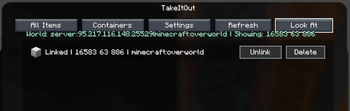
Look Atshows the container currently under the crosshair without linking/unlinking it.
-
Added malilib-based settings.
- Hotkeys are configurable through malilib UI.
- Container outline color uses malilib color config.
- Settings are saved in config files.
Changed
Shift + Right Clickbehavior now toggles linked/unlinked state for supported placed containers.Unlinkno longer removes a container from the saved list.- Added a separate
Deleteaction for removing containers from the saved list. - Renamed the old
Keybindsbutton toSettings. - Moved outline color configuration into the malilib settings screen.
- Removed the extra in-screen color button.
- Removed filtering that only showed building blocks in container item views.
1.1.16-1.21.11
测试版- 加载器
- fabric
- MC 版本
- 1.21.11
SHA-1 f8781a24f595c1789a33cf6f482fa6fec1cdd519获取文件 takeitout-1.1.16-1.21.11.jar展开更新日志
TakeItOut - Changelog
Added
-
Added world container sources.
Shift + Right Clickon a placed chest, barrel, or shulker box links/unlinks it as a source for TakeItOut.- Linked containers can be used when the mod cannot find the required block in the player inventory or carried shulker boxes.
- Sources are saved per world/server and dimension, so they survive Minecraft restarts.
-
Added support for pulling items from placed containers.
- Works with chests, barrels, and shulker boxes.
- Supports single-item mode.
- Logs now include world-container request details and source counts.
-
Added outline rendering for linked world containers.
- Container outlines can be toggled with a configurable hotkey.
- Default outline color is green.
- Outline color is configurable through the mod settings.
-
Added TakeItOut settings screen.
- Open with the malilib hotkey
X + T. - Also available through the standard Minecraft Controls menu as
Open TakeItOut settings. - Also available through Mod Menu.
- Open with the malilib hotkey
-
Added
All Itemstab.- Shows all items available in linked world containers.
- Displays item names and total counts.
- No longer limited to building blocks.
-
Added
Containerstab.- Shows saved containers with coordinates and world/dimension context.
- Containers can be linked, unlinked, or deleted from the list.
- Unlinked containers stay visible in the list until deleted.
- Hovering a container row shows its contents.
Look Atshows the container currently under the crosshair without linking/unlinking it.
-
Added malilib-based settings.
- Hotkeys are configurable through malilib UI.
- Container outline color uses malilib color config.
- Settings are saved in config files.
Changed
Shift + Right Clickbehavior now toggles linked/unlinked state for supported placed containers.Unlinkno longer removes a container from the saved list.- Added a separate
Deleteaction for removing containers from the saved list. - Renamed the old
Keybindsbutton toSettings. - Moved outline color configuration into the malilib settings screen.
- Removed the extra in-screen color button.
- Removed filtering that only showed building blocks in container item views.
1.1.15-26.1.2
测试版- 加载器
- fabric
- MC 版本
- 26.1 · 26.1.1 · 26.1.2
SHA-1 e57d7b89d0bc7fe4b0dfed65080e752a3da55150获取文件 takeitout-1.1.15-26.1.2.jar展开更新日志
🧱 EasyPlace & Auto Pull Improvements
✨ What’s new
- EasyPlace now works better when block states differ slightly (e.g.
lit,powered,open) - Improved behavior with walls and fences (handles connection changes more reliably)
- Auto pull now only triggers when the schematic actually needs a block (hologram mismatch)
- Stacked empty shulker boxes no longer block the main pick-block pipeline
1.1.15-1.21.11
测试版- 加载器
- fabric
- MC 版本
- 1.21.11
SHA-1 cd96f3423b34fe9479d4cd56cfec2d90b7c273ad获取文件 takeitout-1.1.15-1.21.11.jar展开更新日志
🧱 EasyPlace & Auto Pull Improvements
✨ What’s new
- EasyPlace now works better when block states differ slightly (e.g.
lit,powered,open) - Improved behavior with walls and fences (handles connection changes more reliably)
- Auto pull now only triggers when the schematic actually needs a block (hologram mismatch)
1.1.14-1.21.11
测试版- 加载器
- fabric
- MC 版本
- 1.21.11
SHA-1 a670157a0dd087bc0dfabaae37d73cdb55ce25ec获取文件 takeitout-1.1.14-1.21.11.jar展开更新日志
🔧 Update
- Fixed ghost items that could appear and disappear (inventory desync)
- Fixed incorrect item movement between inventory and shulker boxes
- Improved handling of main hand item swaps (no more random slot usage)
- Improved inventory synchronization and stability
- Stacked empty shulker boxes no longer block the main pick-block pipeline
- Minor performance improvements
1.1.12-26.1.1
测试版- 加载器
- fabric
- MC 版本
- 26.1 · 26.1.1 · 26.1.2
SHA-1 3e7aa0edaf6bc6467a5be822a1d11dec866465eb获取文件 takeitout-1.1.12-26.1.1.jar展开更新日志
Changelog
🔧 Main
-
Easy Place has been significantly improved: the mod now places blocks more reliably right after pulling them from a shulker.
-
Fixed a common case where the first right-click only pulled the block, and placement required a second click.
-
Added persistence for mode toggles:
Auto Take OutandSingle Item Modeare now restored after client restart.
✨ New
-
Added shulker extraction mode:
- SINGLE ITEM (1 item)
- FULL STACK (full stack)
-
You can switch modes with the B key.
-
⚠️ Compatibility Notice
Older client versions of TakeItOut are not compatible with the current server version.
This incompatibility was introduced after adding Single Item Mode.
Using an outdated client may result in a disconnect from the server.
👉 Please update the mod to the latest version on the client.
1.02
测试版- 加载器
- paper · purpur · spigot
- MC 版本
- 1.21 · 1.21.1 · 1.21.2 · 1.21.3 · 1.21.4 · 1.21.5 · 1.21.6 · 1.21.7 · 1.21.8 · 1.21.9 · 1.21.10 · 1.21.11 · 26.1 · 26.1.1 · 26.1.2
SHA-1 214cff2defb4c9bc4c2e85e6b94a85e5877b9782获取文件 TakeItOutPlugin-1.02.jar展开更新日志
⚡ TakeItOut — Companion Plugin for Spigot & Paper Servers
🔄 Update
- ➕ Added support for Single Item Mode
- 🔧 Improved inventory handling when full
- 📦 Smarter item insertion into shulkers
- ❌ Fixed potential item loss in edge cases
- 🔒 Safer and more stable inventory operations
🔄 Compatibility
- Works with both old and new client versions
- Some edge-case behavior has been corrected
1.1.12-1.21.11
测试版- 加载器
- fabric
- MC 版本
- 1.21.11
SHA-1 f4c26747c2788d84687bc1c74089fe92cbd6f58e获取文件 takeitout-1.1.12-1.21.11.jar展开更新日志
Changelog
🔧 Main
-
Easy Place has been significantly improved: the mod now places blocks more reliably right after pulling them from a shulker.
-
Fixed a common case where the first right-click only pulled the block, and placement required a second click.
-
Added persistence for mode toggles:
Auto Take OutandSingle Item Modeare now restored after client restart.
✨ New
-
Added shulker extraction mode:
- SINGLE ITEM (1 item)
- FULL STACK (full stack)
-
You can switch modes with the B key.
-
⚠️ Compatibility Notice
Older client versions of TakeItOut are not compatible with the current server version.
This incompatibility was introduced after adding Single Item Mode.
Using an outdated client may result in a disconnect from the server.
👉 Please update the mod to the latest version on the client.
1.1.11-26.1.1
测试版- 加载器
- fabric
- MC 版本
- 26.1 · 26.1.1
SHA-1 59e50cf06fecf9ed0ae0bbe6c03cccda9c91ad65获取文件 takeitout-1.1.11-26.1.1.jar展开更新日志
key bindings fixed
1.1.10-26.1
测试版- 加载器
- fabric
- MC 版本
- 26.1
SHA-1 3e38b277d5f181fa2cde2162530708a717cd9cdd获取文件 takeitout-1.1.10-26.1.jar1.1.10-1.21.11
测试版- 加载器
- fabric
- MC 版本
- 1.21.11
SHA-1 90e50d629103ba2514978c9edcc760fe92a335bf获取文件 takeitout-1.1.10-1.21.11.jar展开更新日志
Fix: respect Litematica pickBlockableSlots; Fix Litematica 0.26.0+ crash, add refmap, improve mixin stability.
1.1.9-1.21.11
测试版- 加载器
- fabric
- MC 版本
- 1.21.11
SHA-1 3d7e266d8fdbb5b131998e2f9ac56976a17b8056获取文件 takeitout-1.1.9-1.21.11.jar1.1.9-1.20.1
测试版- 加载器
- fabric
- MC 版本
- 1.20.1
SHA-1 fe4641f5fa45e045831598c2cf5c1bc1b0fb4da2获取文件 takeitout-1.1.9-1.20.1.jar1.1.9-1.21-1.21.3
测试版- 加载器
- fabric
- MC 版本
- 1.21 · 1.21.1 · 1.21.2 · 1.21.3
SHA-1 ac16639b5fed0e913e834b204adb35af9378f48c获取文件 takeitout-1.1.9-1.21-1.21.3.jar1.1.9-1.20.6
测试版- 加载器
- fabric
- MC 版本
- 1.20.6
SHA-1 729dfcee0f030917beffb83b893043562b62994e获取文件 takeitout-1.1.9-1.20.6.jar1.1.9-1.21.9-10
测试版- 加载器
- fabric
- MC 版本
- 1.21.9 · 1.21.10
SHA-1 ebbbdd45d6e56985d0572d841ea8adc1975b7f44获取文件 takeitout-1.1.9-1.21.9-10.jar展开更新日志
🧩 Changelog — Fix for continuous block picking with full inventory
Fixed:
Continuous block picking was broken in mod version 1.1.8, when the player’s inventory was full and contained non-block items (like tools, food, or buckets).
Now blocks are correctly taken from shulkers even when the inventory is completely filled.
1.1.9-1.21.8
测试版- 加载器
- fabric
- MC 版本
- 1.21.8
SHA-1 4c25f0298ba66f4f1bd70482e0871c22bc60fbec获取文件 takeitout-1.1.9-1.21.8.jar展开更新日志
🧩 Changelog — Fix for continuous block picking with full inventory
Fixed:
Continuous block picking was broken in mod version 1.1.8, when the player’s inventory was full and contained non-block items (like tools, food, or buckets).
Now blocks are correctly taken from shulkers even when the inventory is completely filled.
1.1.8-1.21.9-10
测试版- 加载器
- fabric
- MC 版本
- 1.21.9 · 1.21.10
SHA-1 442aed25ac26dc5cb46a12fe348cead7ca430d34获取文件 takeitout-1.1.8-1.21.9-10.jar展开更新日志
When using Right Click, auto-pick now works only on visible parts of the schematic. No more picking blocks from hidden layers, outside the schematic, or through real blocks. The feature fully respects the AUTOTAKEOUT toggle.
1.1.8-1.21.10
测试版- 加载器
- fabric
- MC 版本
- 1.21.10
SHA-1 cfb95160f51d87666713503c87cdad5c02ee0a6a获取文件 takeitout-1.1.8-1.21.10.jar展开更新日志
When using Right Click, auto-pick now works only on visible parts of the schematic. No more picking blocks from hidden layers, outside the schematic, or through real blocks. The feature fully respects the AUTOTAKEOUT toggle.
1.1.8-1.21.8
测试版- 加载器
- fabric
- MC 版本
- 1.21.8
SHA-1 ff2367d4ec8655b2ef22515ea28d4bafebd3b6ef获取文件 takeitout-1.1.8-1.21.8.jar展开更新日志
When using Right Click, auto-pick now works only on visible parts of the schematic. No more picking blocks from hidden layers, outside the schematic, or through real blocks. The feature fully respects the AUTOTAKEOUT toggle.
1.1.7-1.21.8
测试版- 加载器
- fabric
- MC 版本
- 1.21.8
SHA-1 137439149c131b056943b115a9824b987268d87a获取文件 takeitout-1.1.7-1.21.8.jar展开更新日志
✨ New
Added support for Tweakeroo Restock — the mod now properly handles automatic item restocking.
🛠 Improvements
Added handling for stacked shulkers (Carpet / Carpet Extra).
Stacked shulkers are now safely skipped to prevent errors.
Improved handling of high latency (ping) in EasyPlace (Litematica) mode.
Better stability when playing with poor network conditions.
1.1.5-1.21-1.21.3
测试版- 加载器
- fabric
- MC 版本
- 1.21 · 1.21.1 · 1.21.2 · 1.21.3
SHA-1 13a9f5fde4b1f3e84e7ac69e773426b629ff147a获取文件 takeitout-1.1.5-1.21-1.21.3.jar1.1.6-1.21.7
测试版- 加载器
- fabric
- MC 版本
- 1.21.7
SHA-1 ac855d48cc972d4468ccb88c217a99494ad1a646获取文件 takeitout-1.1.6-1.21.7.jar展开更新日志
At the request of my Chinese friends, Chinese language support has been added. Russian has been added as a bonus!
1.1.5-1.21.8
正式版- 加载器
- fabric
- MC 版本
- 1.21.8
SHA-1 514a2fcaa6c1b8890b8b8fd997bb15e8c0ad3d7d获取文件 takeitout-1.1.5-1.21.8.jar1.1.5-1.21.7
正式版- 加载器
- fabric
- MC 版本
- 1.21.7
SHA-1 bfbc31507a42911e3b29ec99a2f712ef2e770c91获取文件 takeitout-1.1.5-1.21.7.jar展开更新日志
Fix for Easy Place mode when building with all layers ("won't place the right block, even though it is also present in the inventory")
1.1.5-1.21.6
正式版- 加载器
- fabric
- MC 版本
- 1.21.6
SHA-1 876a5269309c08ac52206c49699a6dc8b96ee180获取文件 takeitout-1.1.5-1.21.6.jar展开更新日志
Fix for Easy Place mode when building with all layers ("won't place the right block, even though it is also present in the inventory")
1.1.5-1.21.5
正式版- 加载器
- fabric
- MC 版本
- 1.21.5
SHA-1 da7942c091394035bada531715a0c61a5aa1b448获取文件 takeitout-1.1.5-1.21.5.jar展开更新日志
Fix for Easy Place mode when building with all layers ("won't place the right block, even though it is also present in the inventory")
1.1.5-1.21.4
正式版- 加载器
- fabric
- MC 版本
- 1.21.4
SHA-1 7d6eb6c0440d2455023faf11d9898dbd1903b422获取文件 takeitout-1.1.5-1.21.4.jar展开更新日志
Fix for Easy Place mode when building with all layers ("won't place the right block, even though it is also present in the inventory")
1.1.4-1.21.7
早期版- 加载器
- fabric
- MC 版本
- 1.21.7
SHA-1 5ade692018b2963fd6f8c074f83dfb2b407a7b31获取文件 takeitout-1.1.4-1.21.7.jar1.1.4-1.21.6
早期版- 加载器
- fabric
- MC 版本
- 1.21.6
SHA-1 e86611dd1ac512767180945718a83ee555e138be获取文件 takeitout-1.1.4-1.21.6.jar1.1.4-1.21.5
早期版- 加载器
- fabric
- MC 版本
- 1.21.5
SHA-1 4f96c67636ac88c29afc99b86fe6c0c40bffd6d1获取文件 takeitout-1.1.4-1.21.5.jar展开更新日志
✅ Fixed EasyPlace placing wrong blocks when items were in shulker boxes. Now waits for the correct item before placing.
1.1.4-1.21.4
早期版- 加载器
- fabric
- MC 版本
- 1.21.4
SHA-1 f4ad0be716ed63dfaf72b0d1dbde3e13d11c771d获取文件 takeitout-1.1.4-1.21.4.jar展开更新日志
✅ Fixed EasyPlace placing wrong blocks when items were in shulker boxes. Now waits for the correct item before placing.
1.1.3-1.21.5
早期版- 加载器
- fabric
- MC 版本
- 1.21.5
SHA-1 4eb428c14e765e5a54461bd6d3ac14b229281c36获取文件 takeitout-1.1.3-1.21.5.jar展开更新日志
Adjustment of EasyPlace behavior on servers when holding right mouse button
1.1.3-1.21.4
早期版- 加载器
- fabric
- MC 版本
- 1.21.4
SHA-1 0fcc08f658418b9ed8ee0165a34541e8ad4e2f6f获取文件 takeitout-1.1.3-1.21.4.jar展开更新日志
Fixed: AutoTakeOut button behavior (when it worked after second switch ON). Added: Continuous block picking from shulkers while holding right-click in Litematica Easy Place mode (no need to click repeatedly).
1.1.2-1.21.5
早期版- 加载器
- fabric
- MC 版本
- 1.21.5
SHA-1 675398efb87e1c4cdc383d72c99f3bfbb43b6195获取文件 takeitout-1.1.2-1.21.5.jar展开更新日志
Issue - "Holding right click with litematica's easy mode places random inventory blocks every once in a while" fixed.
1.1.1-1.21.5
早期版- 加载器
- fabric
- MC 版本
- 1.21.5
SHA-1 6781c0958d651294792b159bbdcc08f1a28b0bc0获取文件 takeitout-1.1.1-1.21.5.jar展开更新日志
Added: Continuous block picking from shulkers while holding right-click in Litematica Easy Place mode (no need to click repeatedly).
1.1-1.21.5
早期版- 加载器
- fabric
- MC 版本
- 1.21.5
SHA-1 55d658b04ee35b057bf2a9c66c4b053abaaa266c获取文件 takeitout-1.1-1.21.5.jar展开更新日志
Fixed AutoTakeOut button behavior (when it worked after second switch ON)
1.21.4_1
测试版- 加载器
- fabric
- MC 版本
- 1.21.4
SHA-1 a0833469bff17f4567f05aa18afe08fe456baeaa获取文件 takeitout-1.21.4_1.jar展开更新日志
Fixed endless block-getting from a shulkers when a block in scheme is in "yelow-color-different-state" (in auto take-it-out mode).
1.21-1.21.3_2
测试版- 加载器
- fabric
- MC 版本
- 1.21 · 1.21.1 · 1.21.2 · 1.21.3
SHA-1 8c0f5b70d57a80e76dc4601d521ed9cdc191ef82获取文件 takeitout-1.21-1.21.3_2.jar展开更新日志
Fixed endless block-getting from a shulkers when a block in scheme is in "yelow-color-different-state" (in auto take-it-out mode).
1.21-1.21.3_1
早期版- 加载器
- fabric
- MC 版本
- 1.21 · 1.21.1 · 1.21.2 · 1.21.3
SHA-1 339cc0867243920ead45f67b5db787bac057cb46获取文件 takeitout-1.21-1.21.3_1.jar展开更新日志
-
litematica-printer-1.21-3.2.1.jar crash has been fixed.
-
The new auto-getting block from the shulker system has been added (high compatibility with the Me.Aleksilassila.Litematica.Printer mod). It seems to be no errors when even only one free slot is in hotbar (others with shulkers, for example).
-
The right mouse button bug has been fixed (which caused crashes on the main and server list screens).
-
Support for versions 1.21.2 - 1.21.3 has been added.
1.21.4
早期版- 加载器
- fabric
- MC 版本
- 1.21.4
展开更新日志
1)The new auto-getting block from the shulker system has been added (high compatibility with the Me.Aleksilassila.Litematica.Printer mod). It seems to be no errors when even only one free slot is in hotbar (others with shulkers, for example). 2)The right mouse button bug has been fixed (which caused crashes on the main and server list screens).
1.21-1.21.3
早期版- 加载器
- fabric
- MC 版本
- 1.21 · 1.21.1 · 1.21.2 · 1.21.3
SHA-1 53885ce277f73fd475f9240ac56d59df47e294f0获取文件 takeitout-1.21-1.21.3.jarSHA-1 deee0c10056391798e5d2864b1d14c89ce51c13d获取文件 takeitout-1.21-1.21.3.jar展开更新日志
1)The new auto-getting block from the shulker system has been added (high compatibility with the Me.Aleksilassila.Litematica.Printer mod). It seems to be no errors when even only one free slot is in hotbar (others with shulkers, for example). 2)The right mouse button bug has been fixed (which caused crashes on the main and server list screens).
Additionally, support for versions 1.21.2 - 1.21.3 has been added. Additional file - fixed mod when mixin for litematica-printer-1.21-3.2.1.jar crashes.
1.04-SNAPSHOT
早期版- 加载器
- fabric
- MC 版本
- 1.21.4
SHA-1 c6b8f876e8adc51b415d6a26e47ec3d3107e2eb1获取文件 takeitout-1.04-fabric-1.21.4.jar展开更新日志
Support for minecraft version 1.21.4 (changes in pick block mixin and using new class MiningToolItem instead ToolItem)
1.03-SNAPSHOT
早期版- 加载器
- fabric
- MC 版本
- 1.21 · 1.21.1
SHA-1 9f70c085fb6d05b3cd2decceb5614093d6d499c5获取文件 takeitout-1.03-fabric-1.21.x.jar展开更新日志
Minecraft 1.21.1 version support added. Older versions does not support 1.21.1. Only 1.21 :(
1.02-SNAPSHOT
早期版- 加载器
- fabric
- MC 版本
- 1.21
SHA-1 205d6e598087d33776b80a5da803bf8761c55219获取文件 takeitout-1.02-fabric-1.21.x.jar展开更新日志
Minimal fabricloader version has been changed to 0.15.11
1.01-SNAPSHOT
正式版- 加载器
- bukkit · paper · purpur · spigot
- MC 版本
- 1.21 · 1.21.1 · 1.21.2 · 1.21.3 · 1.21.4 · 1.21.5 · 1.21.6 · 1.21.7 · 1.21.8
SHA-1 9647149d7d71129123ca6590e104b8171aeacbc8获取文件 TakeItOutPlugin-1.01-SNAPSHOT.jar展开更新日志
Spigot/Paper servers plugin-companion for TakeItOut mod
Next features has been added:
- items swapping when inventory is full
- blocks are picked if you right click on it in the schematic (trying the place it down)
1.01-SNAPSHOT
早期版- 加载器
- fabric
- MC 版本
- 1.21
SHA-1 efb1a85cea94df12343ddb7561e033f9e588eaff获取文件 takeitout-1.01-fabric-1.21.x.jar展开更新日志
Next features has been added:
- items swapping when inventory is full
- blocks are picked if you right click on it in the schematic (trying the place it down)
1.0-SNAPSHOT
早期版- 加载器
- bukkit · paper · purpur · spigot
- MC 版本
- 1.21 · 1.21.1
SHA-1 274cfeefdcd5c14443c12f565a360bf2db100da1获取文件 TakeItOutPlugin-1.0-SNAPSHOT.jar展开更新日志
Spigot/Paper servers plugin-companion for TakeItOut mod
1.0-SNAPSHOT
早期版- 加载器
- fabric
- MC 版本
- 1.21
SHA-1 2f98749c37e81e7d4e800af1494aba053125924d获取文件 takeitout-1.0-fabric-1.21.jar展开更新日志
This utility picks a block from a shulker by pressing the pick block button.